
Step 1: Nailing the Foundational Basics (NAP & Control)

Before we start pulling the advanced levers, we have to talk about the absolute baseline. If your foundation is cracked, no amount of keyword optimization is going to save your rankings.
In local SEO, your foundation is built on three letters: NAP (Name, Address, Phone Number).
1. The Law of NAP Consistency Google’s algorithm is essentially a massive trust engine. It wants to be 100% confident that when it sends a user to your business, you are actually located where you say you are, and your phone number works.
If your Google Business Profile says “123 Main St, Ste B,” but your website says “123 Main Street, Suite B,” and your Yelp profile says just “123 Main St,” you are creating confusion. To Google, confusion equals a lack of trust. And Google does not rank businesses it doesn’t trust.
The Strategy: Decide on the exact, standardized format for your business name, address, and local phone number. Do not add keyword modifiers to your business name (e.g., “Bob’s Plumbing” should not become “Bob’s Plumbing & Drain Cleaning Chicago”) unless it is your actual, legally registered business name. Google has heavily cracked down on name spam.
2. Claiming, Verifying, and Purging Duplicates You would be shocked by how many businesses have rogue, unverified duplicate listings floating around Google Maps. These usually happen when an old employee creates a profile, or Google auto-generates one based on directory data.
Duplicate listings cannibalize your reviews and split your ranking power.
The Strategy: Do a thorough search on Google Maps for variations of your business name and old phone numbers. If you find duplicates, immediately use the “Suggest an edit” feature to mark them as “Permanently Closed” or “Duplicate.” Ensure you have undisputed ownership of your primary, verified profile.
Pro Tip: Always use a local phone number with your local area code as your primary number on the profile. Toll-free (800) numbers signal a national presence, which actually hurts your local ranking proximity signals. You can add the toll-free number as an alternate.

Step 3: Building Trust with Reviews & Q&A (Moving the Needle)
For years, local SEOs told business owners to “seed” their own Q&A sections with frequently asked questions. Forget that advice. Google recently removed the public Q&A feature entirely, replacing it with an instant, AI-generated answer tool.
When a user asks a question on your profile today, Google’s AI instantly scrapes your reviews, your profile descriptions, and your website to generate an answer. If you want the AI to sell your business effectively, you have to feed it the right data.
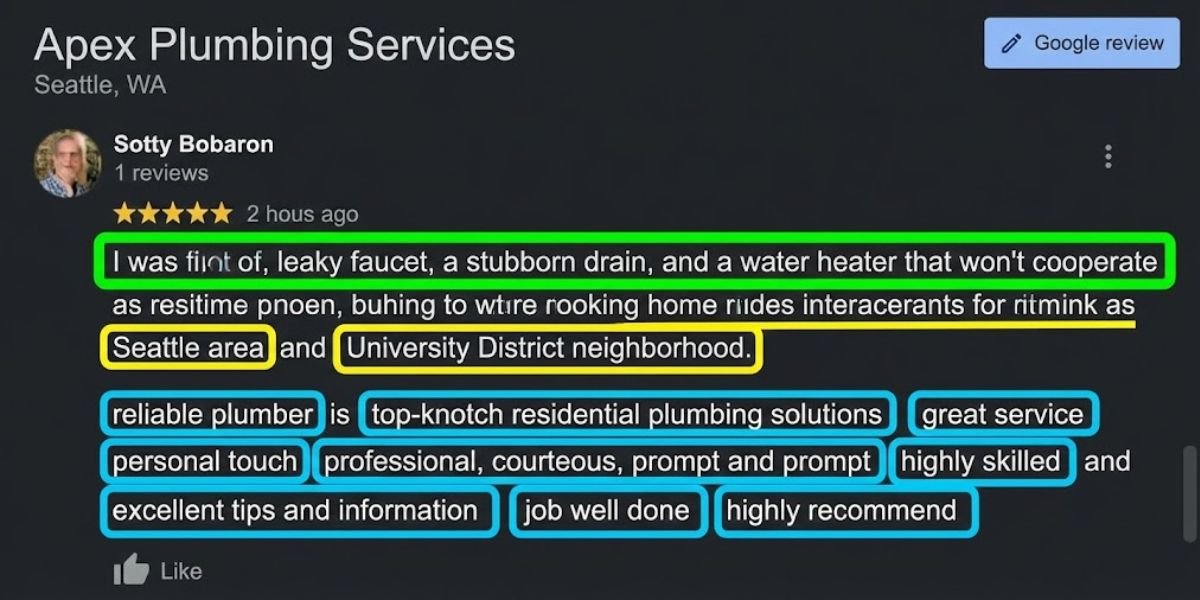
1. The Power of Review Velocity and Context The AI relies heavily on user reviews to answer customer questions. If someone asks the AI, “Are they reliable for emergency repairs?”, the algorithm scans your reviews for the answer. Getting twenty reviews in one week and then zero for the next six months looks unnatural. What you want is velocity (a steady stream) and context (specific keywords).
The Strategy: Guide your customers on what to write. Don’t just send a link; send a prompt: “We’d love your feedback! It really helps us if you mention the specific service we provided for you and what neighborhood you’re located in.” A review that says, “They are the best emergency plumbers in [City] and fixed my burst pipe!” gives the AI exactly what it needs to answer future user questions.
2. The Art of the Owner Response Responding to reviews isn’t just good customer service; it is an active signal to Google that your business is managed, and it provides another layer of data for the AI to pull from.
The Strategy: Acknowledge the specific service and location in your reply, but keep it natural. A perfect response looks like: “Thanks for the kind words, John! We were glad we could get out to your home in [Neighborhood] so quickly to handle that [specific service].”
3. Moving Your FAQs to Your Website (The AI Feeder Strategy) Since you can no longer post FAQs directly on your Google Business Profile, you need to put that data where Google’s AI is explicitly looking for it: your website.
The Strategy: Build out a comprehensive, highly detailed FAQ page on your website. Use natural, conversational language to answer questions about pricing, parking, service areas, and warranties. Most importantly, mark this page up with FAQ Schema. When Google’s AI cannot find an answer in your Business Profile data, it crawls your linked website. By formatting your website correctly, you control the narrative the AI serves directly on the search results page.
Step 4: Visual Optimization & Google Vision AI (How the Algorithm “Sees”)
If you are still trying to game the system by stuffing keywords into the EXIF data or geotags of your photos before uploading them, you are wasting your time. Google strips that metadata out almost immediately.
In 2026, Google doesn’t need your hidden text tags to know what is in a photo. It uses Cloud Vision AI to literally “see” and categorize the physical elements inside your images. If your primary category is “Roofing Contractor,” but your photo gallery is just pictures of your office building and generic stock photos of smiling families, the AI sees a massive disconnect.
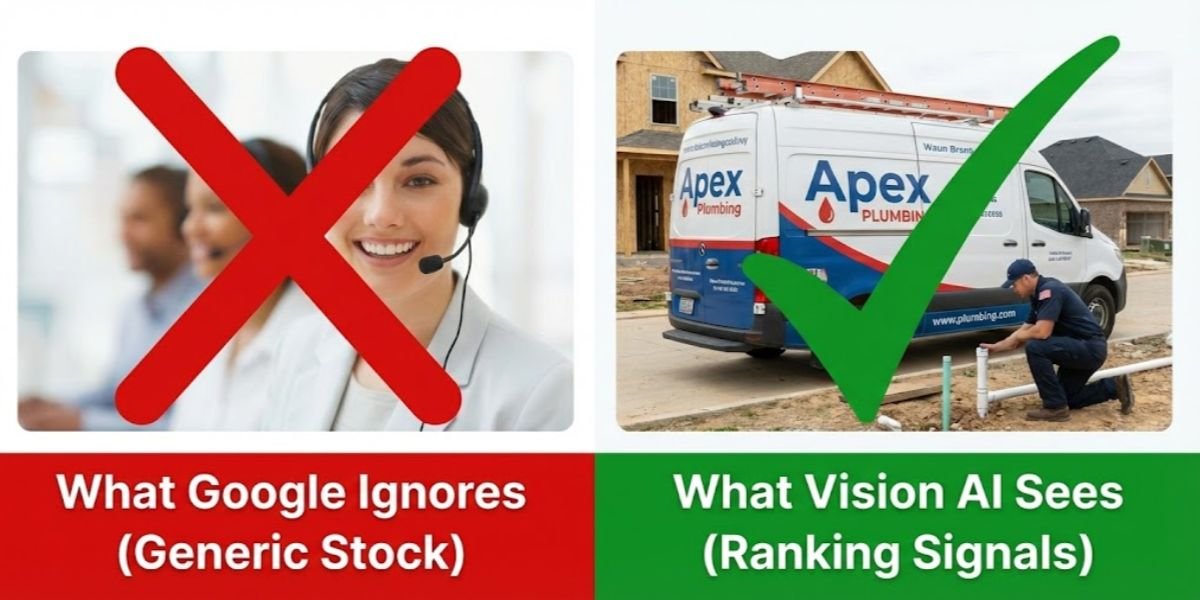
1. The End of Stock Photography Vision AI is incredibly good at identifying stock photography, and Google actively demotes profiles that rely heavily on it. You need authentic, high-resolution images of your actual business, your team, and your work.
The Strategy: Upload “action shots.” If you are a plumber, upload a high-quality photo of a technician actively installing a tankless water heater. The AI will scan the image, recognize the water heater, and associate your profile with “water heater installation” queries, even if you never explicitly wrote that keyword anywhere near the photo.
2. Optimizing Beyond the Profile While Google’s AI reads the image itself on your Business Profile, you still need to optimize how these images are handled when you cross-post them. When you embed these local action shots on your website’s service pages, ensure all alt tags are SEO-focused going forward. This gives search engine crawlers the exact textual context they need to rank your images in Google Image Search, creating a highly profitable secondary traffic source for local queries.
3. Driving Behavioral Signals with Immersive Media Behavioral signals, specifically how long a user lingers on your profile before bouncing back to the search results, are a major ranking factor today. Static images are great, but immersive content keeps users engaged longer.
The Strategy: Invest in a 360-degree virtual tour of your storefront, showroom, or office. This significantly increases the “dwell time” on your listing, sending a powerful behavioral signal to Google that users find your profile highly relevant and engaging.
Why this section works:
Busts Outdated Tactics: It immediately calls out the uselessness of EXIF stuffing, which establishes your credibility as someone who knows what works now, not five years ago.
Explains the “Why”: It doesn’t just say “upload good photos”; it explains the AI mechanism (Vision AI) behind why action shots rank better than stock photos.
Step 5: Driving Behavioral Signals (The Ultimate Tie-Breaker)
If you and your top competitor both have optimized categories, a steady stream of keyword-rich reviews, and authentic, high-quality photos, how does Google decide who gets the #1 spot?
It comes down to behavioral signals.
Google is, at its core, a tracking company. It actively monitors how real users interact with your Business Profile. Do they click for driving directions? Do they call you? Do they click your website link, or do they immediately bounce back to the search results? High engagement tells the algorithm your business is the best answer to the user’s search. Here is how to manufacture those interactions.
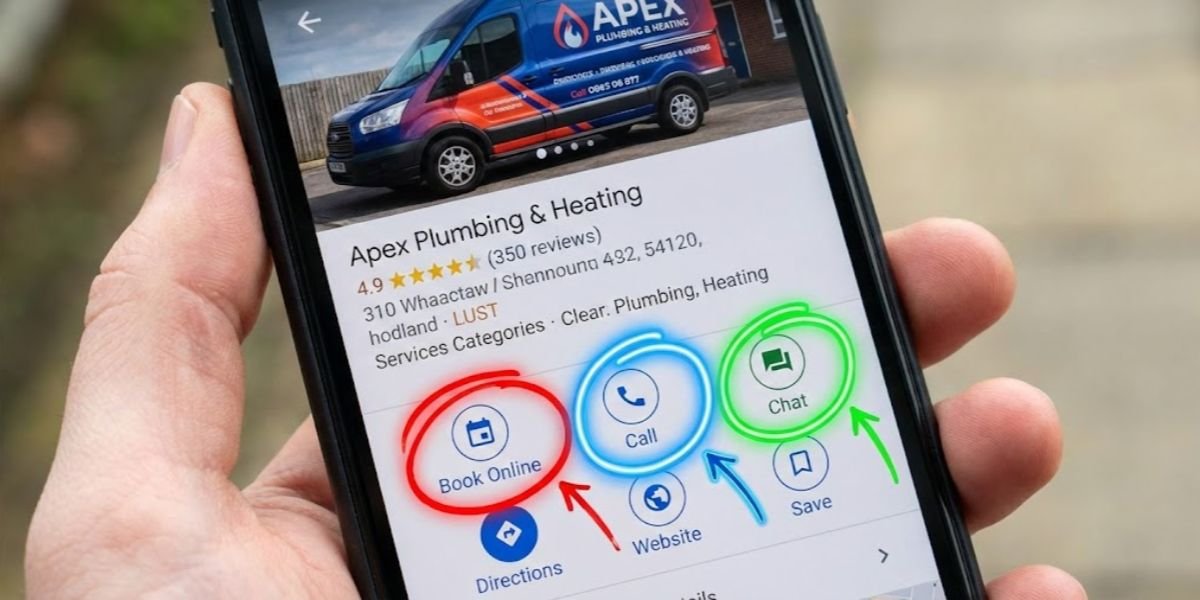
1. Frictionless Conversions (Appointment & Booking Links) We are living in the era of the “zero-click search.” Users want to accomplish their goals directly from the Google search results page without ever visiting your website.
The Strategy: Use the “Bookings” or “Appointments” feature to link directly to your scheduling software (like Calendly, Jobber, or your native booking page). By removing the friction of making a user navigate your website to find a contact form, you massively increase your conversion rate. Every time a user clicks that booking link, it sends a massive positive ranking signal to Google.
2. Treating Updates Like Micro-Ads, Not Social Media Most businesses either completely ignore Google Updates (formerly known as Google Posts) or they treat it like an Instagram feed, posting generic “Happy Friday!” messages. Neither approach works.
Updates are highly visible, temporary billboards directly on the search results page.
The Strategy: Use Updates to promote specific, timely offers with a hard Call-to-Action (CTA). Write a compelling headline, use an eye-catching, authentic photo, and always use the “Call Now” or “Learn More” button. Your goal isn’t to get “likes”; it is to drive a physical click. Regular, click-generating updates prove to the algorithm that your business is highly active.
3. Activating Messaging (With One Major Caveat) Turning on the messaging feature in your Business Profile allows customers to text you directly from the search results. This is an incredible conversion tool, especially for younger demographics who hate making phone calls.
The Strategy: Only turn this feature on if you can commit to responding within minutes. Google actively tracks your average response time and displays it on your profile. If you take 24 hours to reply, Google will eventually turn the feature off for you, and it acts as a negative trust signal. If you reply in under five minutes, you secure the lead and show the algorithm you are a highly responsive, trustworthy local entity.
I have been rolling with this platform for months and it keeps impressing me in the best ways. The betting markets are deep and the live streaming makes every match feel like front row seats. It acts as a dedicated companion for serious enthusiasts. 1xbetloginkorea
Alright, downloaded kinggameapp! Hoping for some fun and games, and maybe a little bit of good fortune. I mean, who doesn’t love winning? Grab kinggameapp and let’s play!
This platform really stands out because of its generous rewards program. I like how they reward loyalty without making things complicated. Smooth transactions and a friendly vibe make it my top pick. abc8vipcom
I have tried many casino apps over the years but this one keeps me coming back for the smooth gameplay and awesome support team. The login process is quick and the promotions actually match the description. Highly recommended for a stress free gaming session. spbet888login
Logged in for the first time today and I am completely impressed by how user friendly everything feels. The game selection is massive and the daily bonuses keep me coming back. If you are looking for a solid sportsbook and casino combo this is definitely worth your time.
Сайты для взрослых полезны в качестве безопасный инструмент посмотреть эротический развлечение без лишних контактов и избыточного стресса.
Платформы лесби студентов full hd открывают приватный режим доступа к разным категориям и дают возможность пользователю самостоятельно выбирать комфортный формат просмотра.
С позиции людей 18+ это простая опция расслабиться в одиночестве и не затрагивать чужие зоны.
Важно, что такие сайты предназначены лишь для взрослых и должны поддерживать нормы безопасности и осознанного решения.
Accessing my account here is always secure and the dashboard shows my bonus progress in a clean easy to read layout. I enjoy the wide range of game providers that keep the library fresh and the weekend reload rewards make my bankroll last longer. Their mobile app runs without any lag and customer care is genuinely helpful. mgm91login